Home
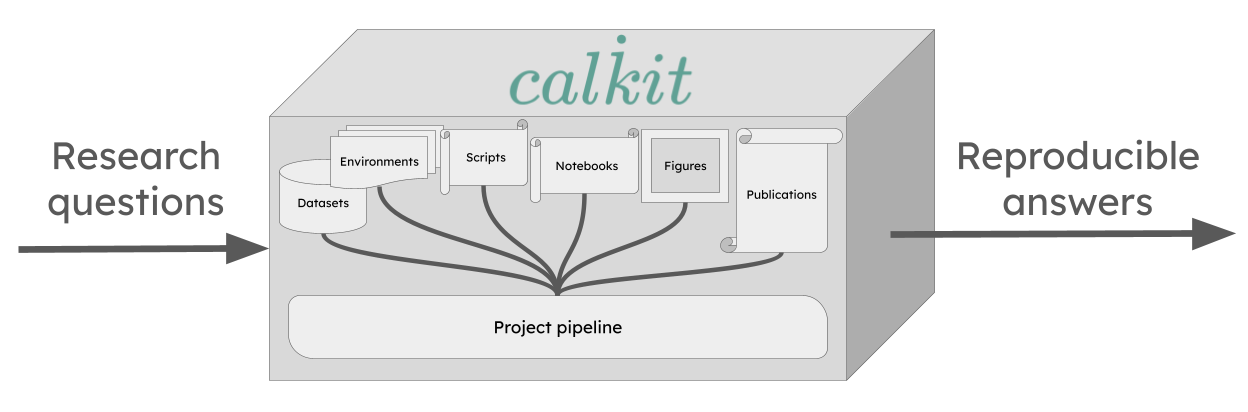
Calkit makes it easy to create single-button reproducible research projects. Instead of a loosely related collection of files split across multiple systems or apps, "integrated" via manual steps, your project becomes a version-controlled, self-contained "calculation kit" tying together literature review, planning, data collection, analysis, and writing, so you, your collaborators, and your readers can verify the full chain from raw data to research article with a single command. This enables faster, more confident, and more frequent iteration, which in turn produces higher quality results. It also makes it easy to check the work of an AI agent, i.e., that the outputs it produced as evidence to answer research questions came from a transparent, deterministic pipeline, not hallucinations.
Calkit also makes it natural to keep all stages of a research project together in the same repository, providing full context to both humans and AI agents. This is important because the stages are tightly coupled. A change in a dataset requires reanalyzing, which creates a change in a figure, which creates a change in a research article. Coupled components belong close together and connected, and cross-stage iteration is enabled by integration.
Software teams learned the importance of integration long ago, unifying design, development, testing, deployment, and infrastructure in the same repo, often within the same team, with automation across the entire lifecycle. Research can benefit in similar ways.
Why Calkit?
The tools to create single-button reproducible research projects already exist, e.g., version control with Git, environment management with uv, Make for a build system or pipeline, and LaTeX for document compilation. If you and your team can work effectively with a system like that, there's no need for any additional complexity.
However, these practices are still not common, resulting in most compendiums failing to reproduce. Many still silo the code away from the data, and the analysis from the writing. Many are instead "multi-button" and irreproducible because their stages are not connected and important setup or execution information is omitted.
There are additional challenges:
- Computationally expensive steps may need to be run on a high-performance computing (HPC) cluster. Automating the transfer of data to and from there requires additional work, and it becomes important to use a content-aware pipeline system, otherwise steps are inefficiently repeated or mistakenly skipped.
- Large data files need to be kept in version control along with the rest. A typical solution may involve siloing data files away on a shared cloud or physical hard drive, requiring custom syncing scripts to avoid manual uploads and downloads.
Again, the tools to solve these problems do exist: Snakemake, Nextflow, or DVC for pipelines; Git LFS, git-annex, or DVC for data version control, but they all require significant setup and training. At this point, you're looking at half a dozen subsystems to integrate and upskill the team to use, essentially requiring many to become de facto software engineers to contribute. What happens in reality is that the costs are deemed too high and the benefit too low, so workflows remain manual and fragmented, and many team members are not able to contribute to their full potential.
Calkit solves these by providing a fully integrated experience built from the open source components that would typically comprise such a workflow. Everything is connected right out of the box, with a command line interface (CLI), web app, and more to reduce friction for every task and team member involved. The integration is transparent without lock-in, so the underlying software engineering-oriented tools can be used directly by team members more comfortable with them, and others can contribute at a higher level while maintaining single-button reproducibility and frictionless, seamless iteration.
Additionally, the Calkit project information format,
saved in calkit.yaml,
gives a full picture of the project:
its research questions, artifacts
generated as evidence to answer them,
and a way to fully verify everything back to its origin.
There's no mystery about where a certain figure or table came from,
and whether or not it's stale with respect to its input data,
which is a critical feature to have when using generative AI.
Features
- A simplified version control interface that unifies Git and DVC (Data Version Control), so everything can be kept in the same project repository. This way, code doesn't need to be siloed away from other important artifacts like datasets, models, figures, or article PDFs, allowing you to work on all parts of a project without hopping around to different tools.
- Computational environment management with support for many languages and environment managers: Conda, Docker, uv, Julia, Renv, and more. No need to create and update environments on your own. Calkit will handle them as needed.
- An environment-aware build system or pipeline with
a simple declarative syntax and
output caching so you don't need to think about which steps or stages
need to be rerun after changing any part of the project.
Simply call
calkit run. Compose your pipeline from many different kinds of stages, including simple scripts, commands, Jupyter Notebooks, LaTeX, and more. - Tools to automatically build a reproducible pipeline from work you're
already doing.
Run a script, notebook, or LaTeX document with
calkit xrand it will be added as a pipeline stage, with its environment, inputs, and outputs detected automatically. This way, an existing project can be made reproducible one step at a time. - A complementary self-hostable and GitHub-integrated hub web app to facilitate backup, collaboration, and sharing throughout the entire research lifecycle.
- Overleaf integration, so analysis, visualization, and writing can all stay in sync (no more manual uploads!).
- Support for running on high performance computing (HPC) systems that use PBS or SLURM schedulers.
- Support for automated running with GitHub Actions.
- Extensions for doing all of the above graphically in JupyterLab and VS Code.
- A browser extension for collecting references directly to BibTeX (optionally synced with Zotero), viewing DVC-stored files on GitHub, and syncing figures and results with Overleaf directly in Chrome, Microsoft Edge, and more.